Wednesday, May 11, 2016

Mobile App - GBV Data Collection

Gender Based Violence is one of the Global issues affecting communities today. In Papua New Guinea, various efforts have been made to curb this issue amongst the Government, NGOs, Churches and other Donor agencies. An interesting project recently being piloted by the United Nations Development Program (UNDP) here in Papua New Guinea (PNG) is aimed at easing the burden of collecting Gender Based Violence (GBV) data throughout the country, available for access by the National Government, United Nations (UN) and World Health Organisation (WHO).  This pilot project is currently underway and selected provinces (National Capital District, Morobe, Milne Bay and East New Britain) are now undergoing workshops aimed at training Frontline GBV organisations to supply data to a central hub which will then be generated and used by the Government, UN or WHO.


As of 18th March 2016, I was contacted by the UNDP office here in Port Moresby to coordinate and manage the National GBV Data collection project, which is currently rolled out.  The contact came after a nomination made by the current Dean of the School of Humanities and Social Sciences, who is our head of school here at the University of PNG.

With the help of improved technology today that requires little knowledge on programming, one can develop a mobile application for any specific use and install it on any mobile device for use.  This is exactly what happened in this UNDP-led project where Gerald Okello, a health specialist from Uganda currently working in Madang as a volunteer with the Voluntary Service Organisation (VSO), worked on transforming the application from traditional paper-based format to electronic format, deploy-able on mobile devices.


During the implementation of this GBV Data Collection (Pilot) project, I was invited to travel to various provinces with international Health specialist (VSO) and GBV/FSV Case Management Specialist and Coordinator (UNDP) conduct training on the use of the mobile app that was created.  Participating agencies dealing with GBV issues were taken through a session on how to enter data, track progress and do other tasks with the app using the tablet.  Following this session, members were given a tablet, bounded by an agreement with UNDP to take ownership of each of the tablets and information collected.


As of the beginning of May 2016, I am managing the National GVB Data Collection project, updating UNDP on progresses and results of incoming data as well as generating reports and statistics on collected data.

To me, it's an amazing project to work on especially managing and coordinating the records of incoming data from over 50 field workers (for the pilot project only, which will increase to over hundreds of workers during main project) and having manage data on-the-move and at your finger-tip.

Saturday, March 26, 2016

Developing Contents for Universal Learning

I'd like to re-iterate again that this blog has nothing to do with any body or any organisation that is/ are named within the posts of this blog.  Everything posted are my first-hand stories about my engagements in the drive to support the title of this blog site "Providing Digital Opportunities for the disAdvantaged - share the knowledge to develop the region".

Well for this post, I will share one of my participation at a UNICEF funded workshop which was supported by the Department of Education (PNG) for the digital practitioners here in Papua New Guinea. The workshop invited participants from different sectors who went to Madang to develop Early Childhood Learning materials for children under different age groups.

I was again invited by the Department of Education (Papua New Guinea) to participate with other fellow content designers in a workshop in Madang. This was the second time; similar workshop was conducted in 2014 where I sent 2 representatives (Amos Manasau & Jessy Joe) to participate in that workshop.  Last year (2015), I went there myself and participated at the workshop in order to understand the concepts behind Universal Basic Education (UBE), which this workshop emphasized on.


I got a request from the Department of Education (Media and Communications division), to nominate at least 10 graphic designers/ illustrators in my network to attend this workshop.  Instead of nominating, I posted a notice on one of our social network groups on Facebook (PNG GFX Designers) and 5 young designers volunteered to go along with me so I sent their details to the facilitators and they organised tickets for all of us except one, who lives in Madang.  The five were former students from the Arts and Design program at the University of Papua New Guinea who are attached to various organisations during the time they were taken to the workshop.
The idea of involving these young men and women was to expose them to some of the approaches and requirements of designing reading & learning materials for early childhood learning, in particular considering universal learning.  Additionally, I thought this would be a great experience for them to participate in a collaborative project at the workshop so that they gain some experience working in a team, doing a project within pressing deadline.

During the workshop, we were all placed into groups of 5-8 members comprising various working groups ranging from Production of Books, Videos and Animations.  My group was one of two groups that were tasked to produce an animation at the end of this 30-40 hour project.  In our group were two other members whom I took with, Anderson Habiri and Brian Aiere.  Anderson and Brian were recent graduates and animation is something totally new to them. They were to do illustrations and graphics for our animation however, that also required them to have fair knowledge on animation so they can develop characters appropriate to be animated.  I had to fill in this gap by giving an overview of what we should expect and where each of us would fit in, outlining our specific duties as illustrators and animators for our project.  I had to also take them through basic concepts of animation and how frame by frame animation works as well as showing them some tweening animation basics.  We also have other members who fitted in for sound and children's psychology & behaviour.
The vector drawings in (above) with the fills (below)
For me, that was going to be fun exploring animation as an introvert/ animation enthusiast however getting into my suit as a perfectionist and a number 1 in the Enneagram,  I was worried as time was very crucial for us to come up with an animation product.  Unlike other groups, our group needed more time to complete the compilation however the workshop trainer, Barbara Kolucki assured us that we can still get something done within the time frame.  She stressed that based on her previous experiences with various other places around the world where she conducted the training.  Sure we can, however it won't be to our satisfaction or to a professional standard, I thought.


The workshop's project challenge began and all the group went straight onto planning and execution of their respective projects.  We had a day to do our interviews, investigate and record any audio; basically to gather raw data - and the next day to start developing our illustrations and trace them to vector.  

Back at our table, our group came up with the script.  I then did a quick storyboard to guide us in developing our images for the main poses.  This is shown to the group for approval, then to the trainer, to get the OK to continue.  We got our green light from the trainer so everyone started working on their tasks.  The illustrators worked on the illustrations whilst our sound designer, Josh Tamanabe worked on scheduling the young students of Kranket Primary School to be recorded.
Original Quick Sketches I did for our storyboard
We spent few hours trying to figure out how our illustrators would come up with the poses for our animation.  It was very challenging, considering the time constrains versus the limited knowledge our illustrators have to develop illustrations for animation so our next option was for me to guide them through thumbnail illustrations which they followed to refine.  This approach turned out well so we progressed.  We got all the illustrations done manually, got them traced (vector graphics) and brought into our animation program for manipulation and animation.  

We had almost a non stop period from 3pm that day till 3pm the next day, completing all our timeline and synchronizing sound with the animation.  We added sub-titles to help those students who aren't able to hear (the deaf) and finally converted the versions to various platforms for distribution.

In our final presentation, we presented our production on various outputs representing those that can be played on a computer, using online (youtube & website) and on mobile/ android devices. Just to make it a little bit interesting, I added a matrix code to a card, printed it and used it as our access code to see the video.  This is to show how technology can be used to directly access the video through scanning using a barcode scanner.
The matrix code added to a card for our presentation

Tuesday, August 11, 2015

Custom Typeface that Promote Culture

The idea of developing Custom-Fonts came about in mid-2006, after going through several of the publication designs (posters, brochures, prints, signs & billboards, etc..) done within PNG and seeing that we are not culturally represented in some of the publications.  Because culture is an integral part of Papua New Guinean societies, I feel there is greater need to promote it more using provided technology.  This challenged me to research further on some ways to incorporate our cultural themes with technology and share it to the world.

I came up with some fonts for my collections in 2006 but then thought it would be more wiser to include the younger generation (my students at uni) in this project.  So in 2007, this thought paved way for more collective cultural motifs from younger typograpers which resulted in the development of version 1.0 of Kumul Fonts.

Kumul Fonts Version 1.0 is specifically dedicated to raising funds for more innovative projects.  The individual fonts each carry the designer's names and theme.  All of the fonts are branded KF, short for Kumul Fonts.

Culturally, Papua New Guinea is so diverse in terms of it's cultures and languages.  So complex in many ways culturally and geographically.  As of the writing of this post, we have not really developed our own typefaces or even thought of creating something that other people would use particularly in art during this time of technological intervention.  I've realised this and thought it'd be more interesting if we start working on this font collections.  In a way, this creation can open our eyes to look beyond just using someone else's creation and start creating something that other people can use.  This can be a positive direction that will contribute to the design industry of our country.

From a personal direction, Kumul Font development is part of the drive to utilise my abilities in visual arts and computing, making use of the few years of prior trialing.  It put together different knowledge in illustrations, graphic design, multimedia, software programming, project management and leadership.


DEVELOPMENT PROCESS:

Before the designs are sketched and illustrated, a subject is selected.  In this case, the subject is the common cultural figure/ identity or traditional design likely to be found in the designer’s home ground. Again, for someone from the Popondetta area in the Oro Province, the designer would most likely select the Tapa design as the subject to base the types around.  We tried to make it more generalised so that each theme captures and promotes the different regions.
From the subject, characters are developed to imitate letters A – Z (upper case) and a – z (lower case), numbers 0 – 9 and common symbols such as ? ! “ : ; ‘ / , . & ) ( _ \ etc…

These characters are custom to the keyboard on the computer and they are the characters which would be brought up when the user type the keys responding to each character.
The illustrations are traced with inks (usually calligraphic pen), the characters scanned and digitized, cleaned, traced and converted into readable font formats (True Type Fonts).  Once all these has been done, the fonts are compiled using one of the programming languages and all contents packaged (put together) ready for distribution.

RECOGNITION:
This initiative (former-Fantasy Fonts) was nominated as the best e-Culture project of the Pacific by panel experts in New Zealand for the World Summit Awards in Britain in 2008.

COMPATIBILITY:
The current version [Kumul Fonts V1.0] is packaged for distribution on windows  computers.  In the future, we would create versions compatible for macintosh.

Once the fonts are installed, they are standardized and will work on any application that enables the use of fonts.  The fonts have been tested on all Office applications (Word, Access, Excel, PowerPoint, Publisher), Adobe applications (Illustrator, InDesign, Photoshop,ImageReady,) and most other applications that uses texts.  I will still upgrade the version with new features and new font designs would also be added as well in the future.


CREDITS:
Digital enhancements, Fonts Conversion and Software programming is done by Me, myself and I (smiles)..

The illustrations of fonts are done by Final year Arts & Design students of the University of PNG in 2007, 2008,2009,2010 and 2011.

PUBLICATIONS:
Sunday Chronicle FEATURE Sunday January 27 2008
National Newspaper WEEKENDER              December, 2007
In Moresby Tonight FEATURED ARTIST December, 2007 8:30 pm
Radio Australia THE LOOP Tuesday October 28 2008 1:30 pm

Sunday, July 19, 2015

More Free Tutorials

FREE TUTORIALS FROM ARTECH.COM.PG


HOW TO DOWNLOAD TUTORIALS:  
1: Click selected tutorial below
2: New window appears (wait for 5 seconds)
3. Click the SKIP AD button
4. PDF/Zip file will be downloaded


Tutorial Name: Mobile access to Edmodo

 Level: Beginner
 Format: PDF
 File Size: 314 KB
 Date Uploaded:  30.03.2016
This tutorial is for those who attend my online classroom via Edmodo. It is a guide to help students log in from their mobile devices or tablets and access the features so that they can interact with their peers or their teacher.

Tutorial Name: Create a Blog with Blogger

 Level: Beginner
 Format: PDF
 File Size: 624 KB
 Date Uploaded:  19.02.2015
I have recently conducted various training on blogging and this is one of the recent one I've created. It's very basic but has follow-up series which will take you further. In this tutorial, you'll learn how to create your blog using one of Google's free service called blogger.

Tutorial Name: Create 3D Text [C4D R14]

 Level: Beginner
 Format: PDF
 File Size: 591 Kb
 Date Uploaded:  30.04.2014
This tutorial shows how to create 3D text using Cinema 4D. It includes the use of the Text spline object, nurbs, the attribute editor, objects window and the render view. Try it out and use 3D text in your graphic projects.

Tutorial Name: Record Audio [Audition CS6]

 Level: Beginner
 Format: PDF
 File Size: 495 Kb
 Date Uploaded:  30.03.2014
Ever want to record audio to your computer in a professional manner? This tutorial will run you through the necessary steps such as creating sessions, arming tracks, recording, naming tracks and saving sessions. Learn Adobe Audition, the leading-edge audio-editing application widely used across the globe.

Tutorial Name: Compress multiple files using WinZip

 Level: Beginner
 Format: PDF
 File Size: 339 Kb
 Date Uploaded:  15.02.2014
Learn how to compress multiple files into 1. Very useful for those sending files over the internet, especially emails. Compress anything from images, texts, videos, data, folders - all into just 1 file. Follow the simple steps provided in this tutorial.

Tutorial Name: Editing in Adobe Premier

 Level: Beginner
 Format: PDF
 File Size: 3.66 Mb
 Date Uploaded:  20.01.2014
This tutorial is taken from one of my many lectures I gave on Video Editing using Adobe Premiere. It takes you through the important components of the software such as tools, workspace, interface and a brief on the editing method. It is actually shots of slides for the lectures but I believe will give you a better start.

Tutorial Name: Coding Webpages from Scratch-Part2

 Level: Beginner
 Format: PDF
 File Size: 306 Kb
 Date Uploaded:  27.11.2013
This is the second part of the previous tutorial. It continues from the previous tutorial and takes you further into using CSS to style a page. It's a simple one but very effective if you try it out.

Tutorial Name: Coding Webpages from Scratch-Part1

 Level: Beginner
 Format: PDF
 File Size: 1.38 Mb
 Date Uploaded:  20.11.2013
This tutorial introduces some basic fundamentals of creating webpages using codes. This is the first part which covers the html basics and a bit on css as introduction.

Tutorial Name: Create Custom Brushes in Photoshop

 Level: Beginner
 Format: PDF
 File Size: 367 Kb
 Date Uploaded:  20.08.2013
Create Custom Brushes in PhotoshopThis tutorial demonstrates how to create custom brushes in Adobe Photoshop. Learn it and create your own custom brushes for use in any of your designs.

Tutorial Name: Basic Editing in Adobe Photoshop CS4

 Level: Beginner
 Format: Zip
 File Size: 3.72 Mb
 Date Uploaded:  22.07.2013
This tutorial is for those wanting to learn Adobe Photoshop. It is a basic tute with aims to give you a general view on how to do basic editing in Photoshop using few of its tools. If you have never used Photoshop before, this one is for you.

Tutorial Name: Download Files with Internet Download Manager

 Level: Beginner
 Format: PDF
 File Size: 520 Kb
 Date Uploaded:  01.07.2013
Many times, a lot of people have problems downloading files from the internet. Have you ever faced problems such as breaks in file transmission or network failure or even your units ran out from your internet dongle and you couldn’t complete the file download? This tutorial will introduce you to this lovely program called Internet Download Manager (IDM).

Tutorial Name: Convert Any File to PDF

 Level: Beginner
 Format: PDF
 File Size: 225 Kb
 Date Uploaded:  20.06.2013
Learn how to convert any file to PDF using Acrobat Distiller. In this tutorial, you'll learn how to convert a word document to PDF. You will also learn to convert a webpage to PDF. This one's another beginner's choice.

Tutorial Name: Review Blocked Sites

 Level: Beginner
 Format: PDF
 File Size: 535 Kb
 Date Uploaded:  17/06/2013
This is a step by step instruction for website administrators to review and restore their blocked website. Usually compromised websites (hacked websites) are automatically blocked by Google to protect its users. Browsers cannot display websites instead display a warning page from google. This tutorial shows you how to get your site back online by requesting a site review from Google.

Tutorial Name: Create a Sliding iPhone Animation

 Level: Intermediate
 Format: ZIP (includes PDF tute & working file)
 File Size: 4.28 Mb
 Date Uploaded:  17/06/2013
This tutorial shows you how to do a simple sliding iPhone animation in Adobe After Effects. Animate a hand sliding on an iPhone to reveal different screens. Kind of straight forward tute but adds to a list of your different tute collection. Try this motion graphics tutorial using one of world's leading motion graphics program.

Tutorial Name: Create 3D Monitor using a cube object

 Level: Beginner - Intermediate
 Format: PDF
 File Size: 603 Kb
 Date Uploaded:  19.05.2013
This is again another 3D tutorial demonstrating how to model a simple computer monitor with a cube object in Cinema 4D. The tutorial covers the different tools one can use in C4D and takes you throughout the process. Have a go at this one.

Tutorial Name: Creating a Simple Table in Maya

 Level: Beginner
 Format: PDF
 File Size: 279Kb
 Date Uploaded:  30.04.2013
This simple tutorial takes you through a quick rundown on using Maya to create a table. Spend a few minutes doing this exercise and you'll find some helpful tips.

Tutorial Name: Flash Interactive for Beginners- Part 1

 Level: Beginner-Intermediate
 Format: PDF
 File Size: 450 Kb
 Date Uploaded:  26.03.2013
A quick rundown on the few steps involved in creating a basic interactive interface with buttons activated. Very simple to start you off. Take some minutes to complete the exercise to gain the basics.

Visit the Website to view all other tutorials.


Thursday, April 23, 2015

Supporting Distant Learning through Open College

Recently, I was invited to present my pre-research slides at the "Research and Short Professional Courses Workshop" (held on the 23rd of April 2015) to the senior Staff of the Open College, University of Papua New Guinea about my drive to bridgea the Digital Divide in Papua New Guinea through the development and establishment of a virtual classroom.  At this workshop, I shared some of the references relating to online learning especially using a virtual classroom (Virtual Klasrum [VK], as I called to localize the term).  

sharing mapped locations of project


I also shared some of the pre-research activities and findings I did with my people at the village level.  The concept was new to all of those who were present at the workshop; though it was related to an element of what had already been introduced into the college through their Open Sourced Moodle system which they've developed and trialed out.  The VK/VC concept exploded their imaginations further to the endless possibilities that technology can provide to take learning further to our rural areas.  

The Virtual Klasrum research I carried out started in 2012 after I realized the need to support the people in the village and nearby villages with basic knowledge that are necessary for their development, especially by providing information that is vital to help them sustain their livelihood through small projects they intend to initiate. 

clarifying the vk concept


The idea was to create a knowledge platform that is available 24/ 7 for people in my village or even other remote villages to access whenever they stumbled into situations requiring seeking of knowledge on "How-Tos" to get them moving so that can motivate them to excel in whatever ideas they come up with.  The challenge is to create a system that can be accessed by everyone including those in remote places using available services.  There are countless barriers to achieve the fruition of such ideas however there are also possibilities because the advancement of technology today and in the future will help make them happen.

staff interacting during question time.


Since it was my first presentation regarding the exposure of this pre-researched subject, I prepared it to be pure theoretical so that was made known to the attending staff.  However, I did gave references to evidences of what had already been done as well as carried out so far and what other things or areas that I hoped to advance into.  Above all, the overall intention is to create a living product that can serve the entire nation, connecting our people in the village with those in urban areas including the outer world.  Moreover, this living product can be part of the people and be a system that provides streamed information that are necessary for them so they wouldn't rely much on continuous outside support other than being reliable to help contribute to nation building. 

discussions after the presentation.


(Photographs: courtesy of ArTech, shots by Bingmalu Yalamu)


Friday, April 17, 2015

Interactive Appz to enhance Learning

Since the beginning of April, I've started working on interactive applications and children's games to help me expand my understanding on interactive learning and also support the drive to leverage digital literacy in Papua New Guinea and the Pacific. 

The interactive media industry in the country is not popular especially looking at it from the application development perspective.  You would barely hear people talk about developing applications that target training and development using local contents.  I've tried searching around for similar development teams here, however still haven't been successful.  This had prompted me to come up with one or few applications which I hope would push me to further develop even more engaging applications which can be used to help those wanting to acquire digital knowledge through uniquely fun ways.

These days, the learning process is presented in amazingly innovative and engaging ways throughout the world and interactive learning is increasingly being used throughout most learning platforms and systems.  With that in mind, I thought It'd be good to work along the line of developing rich media content from local knowledge (data) utilizing interactive media.

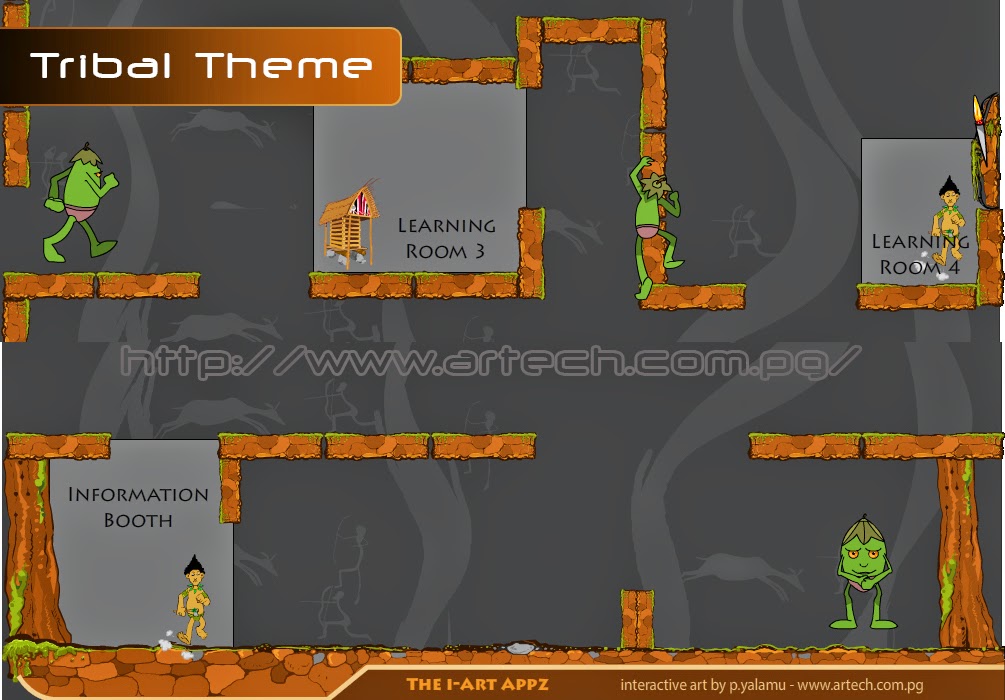
The first application I created this Month, was a simple yet fun and innovative approach (I think) to learning that embeds traditional concepts to modern experience in an engaging and fun way.  Further to that, I developed again another fun application that uses the concepts of a platform game however has different stages of learning and challenges which the user will go through.  Just recently before this post was written, I worked on another simple game for kids to play with the concept of engaging them to find their way around from one end of a wall to their target through obstacles or enemy lines, as normally referred to in gaming environment.


With all these games and even others yet to be developed, I hoped to use existing experiences and apply standard learning approaches to engage different audiences.  There were few things I've noted that were common in most of our learners and the one that stood out the most was visual messages;

    1) People are used to visual messages and they learn very quickly, their memory can hold visual message longer than written.  But it'd be a standard rule to include what they are good at (visuals) with texts and audio to meet current presentation standards.    

    2) Literacy level is low, and with the influx of people moving in from rural to urban areas, most of them still lack better understanding of reading written content so again, visual message works better, but with the inclusions of audio and texts.


Further to the fact about the power of visual messages, it is obvious that people are deeply rooted to their society or tribes.  Cutting them from their tribe or society is something that might probably take decades to happen.  With this strong bond that people had with their societies, it had given me confidence to develop interactive media content with visual messages that portray the purpose of the learning as well accompanied by custom themes to reflect the backgrounds of the audience; making them be part of this learning process.


Monday, February 23, 2015

Mobile Learning - Use of Android Devices

Since November 2014, I started a new drive as part of my contributions to leverage digital literacy in Papua New Guinea through empowering individuals, organizations and corporate bodies in various Information & Communications Technology (ICT) training.  The focus now is in establishing a clear vision for the future in terms of learning and development and by far, the future will be more technology-oriented.  The world will get smaller and smaller and everything will be at the tip-of-our-fingers.  Learning will be enforced through the use of mobile devices and applications and therefore, we need to educate our people on how to effectively use mobile and android-powered devices to access digital contents or any other available learning resources from anywhere at anytime.  

Information providers, in particular - content developers have looked at easing users' burden to access digital information by bringing the information to the user and not like what used to happen before where users go to search for the information.  Likewise, software developers and hardware manufacturers have already worked on developing platforms that will fit the future.  It is now time for content creators/ developers worldwide to educate the users on how they could use these platforms to help them learn better and even fit into the ever-changing world.

From a general observation I did in various places I visited last year (Hawaii, Australia, Taiwan) including Papua New Guinea, a lot of people these days do not spend time to read the manuals, instead head-on straight to using the services hence resulting in them not utilizing the full potentials of the services they use.  This applies to both the hardware and software that people use.

Content designers/ developers must learn to change the way they present their content by adapting to approaches that is going to be convenient in future and cope with global trends.  There are many things happening these days in regard to technology & learning, and  the barrier I observed was "Knowing How" so I hope more volunteers would rise to help minimize the gap.

Well, I've recently conducted few trainings here in Port Moresby in line with my goal.  Images in this post are some of the recent workshops & trainings I conducted.  Featured here are the training conducted to an android supplier to help them talk the language of the future when selling their android devices and the other was for academics to utilize android-powered devices to deliver learning resources and go paper-less.


There are few other workshops and training I am currently preparing for various schools and corporate bodies in the weeks and Months to come which I will also post to share in this blog.

Tag along if you'd like to hear more of my drive to promote the use of android-powered devices in mobile learning.